Xpert-Timer is also available with a rental license. With a subscription, you can choose the duration for which you want to use the software. This is particularly useful if you need time tracking specifically for a particular project.
Xpert-Timer is licensed per employee, not per workstation. You need as many licenses as you want to create employee names in the system. If an employee leaves the company, set them to "Inactive" and the license they were using will be freed up.
Trial
You can test the full functionality of the software for 30 days. If you do not activate the software after this period, you will retain the right to read the recorded data, but you will no longer be able to make entries.
If you decide to use Xpert-Timer after the 30 days, you can choose the rental rate.
Term
Choose between a three-, six-, or twelve-month subscription. To use the rental license, you must sign a SEPA direct debit mandate or pay for the subscription by credit card via our partner portal "ShareIt."
After the rental license expires, your subscription will be automatically renewed unless you cancel it at least 4 weeks in advance.
Cancellation
If you cancel the subscription for the rental license, you will continue to have read access to the data entered in the system.
Ordering the subscription
You can obtain your license via the website: https://www.xperttimer.de/mietlizenz.
Your license overview
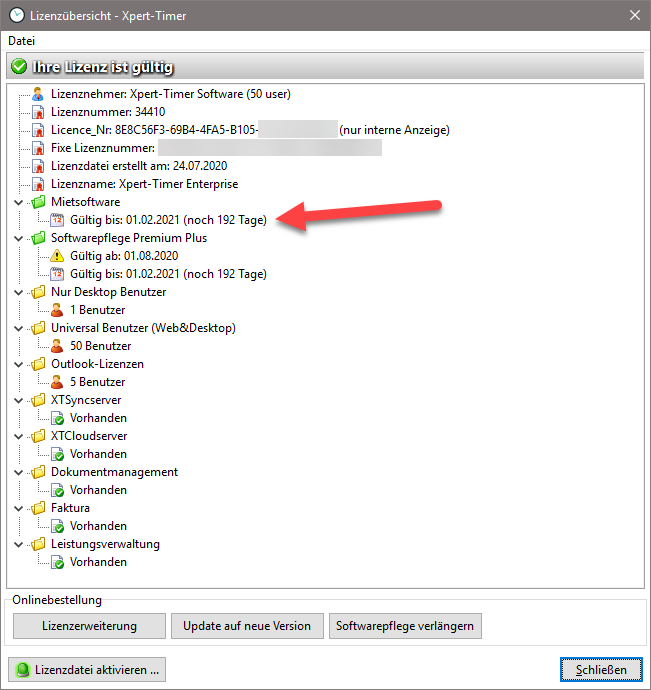
You can find the term of your rental license in your license overview, which you can display in the project manager via the menu item "Help" -> License overview. Two weeks before the license expires, you will automatically receive the renewal by email.
Import the license file you receive by clicking on the "Activate license file" button.
If your license expires before you receive the automatic renewal, please contact our support team at: service@xperttimer.de