A simple profit/loss calculation is available in Xpert-Timer.
The project costs (flat rate, hourly rate) are stored in the project properties in the "Billing" tab. If you want to see both the hours and the flat rate for your comparisons, please enter the "hourly rate" first and then switch to "flat rate."

In the "Profit/Loss" tab, you will see a comparison of your project income and expenses. Here is a brief description of how the individual fields are calculated.

If you filter by status for completed, approved, or billed projects, the original filter changes from "Project created" to "End of entry." The date of the end of entry is set via the status. The date on which the project status was set to Completed, for example, is also the date that is entered in the "Actual end" (end of entry) field.

Description |
The project name |
P/L |
The profit/loss is calculated as follows: Flat rate or price on an hourly basis ./. Employee costs +/- Services P/L In |
Profit in |
The percentage profit based on the costs incurred (services G/V + employee costs) |
Flat rate |
If a flat rate is stored in the billing settings for the project, this is always used as the basis for calculation. |
Price on an hourly basis |
This is the price specified per billing unit in the "Billing" tab of the project properties. |
Price estimate |
This price estimate is calculated from the billing rate stored for the project or employee (depending on the selected billing type) and the "estimated time." Formula: Estimated time * billing rate = price estimate |
Services G/V |
If you have recorded services for your projects, the expenses are deducted from the income in the services in the background. The result is displayed here as Services G/V and is treated as an expense. |
Employee costs |
The "internal costs" of the employee, which are stored in the employee properties. |
Time required |
The times recorded in the team. It makes sense to filter this evaluation across all employees so that you can see the total amount of time recorded. |
Estimated time |
You can enter a time estimate for each project. This estimate is for control purposes only and is the basis for calculating the price estimate on an hourly basis. |
Time consumption in % |
A graphical bar that shows the percentage of time you have used so far in relation to your estimate. |
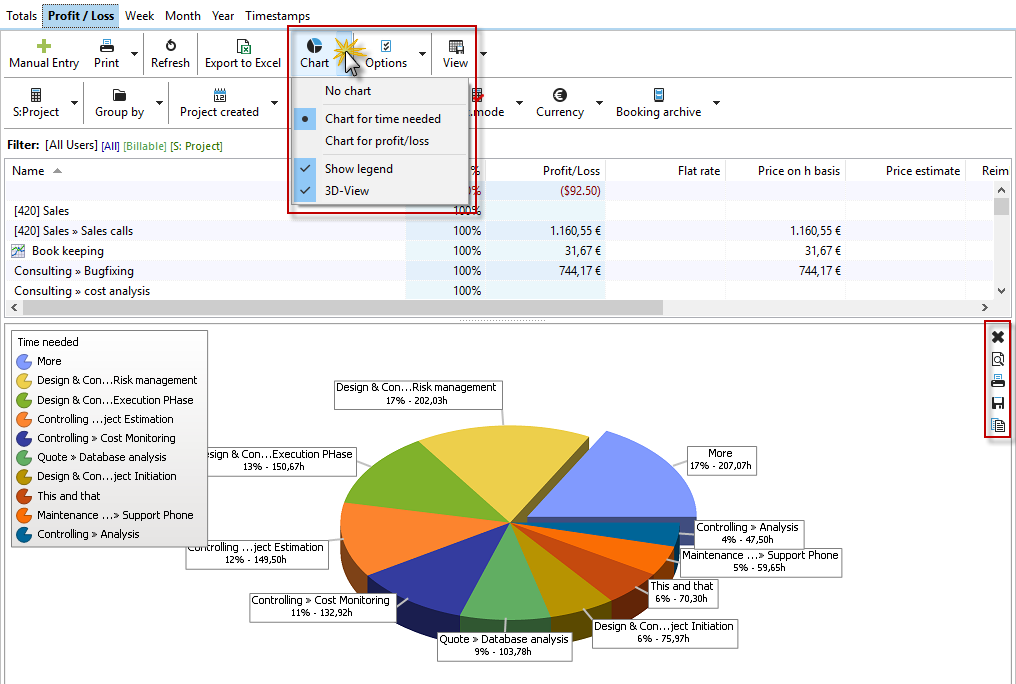
The chart that appears below your evaluation always uses the grouping in your list view. You can enlarge, print, save, or copy the chart for further processing. Click on the "Chart" button to access various options for the chart.