With Xpert-Timer , you have chosen a professional project time tracking solution.
Here is an excerpt of the industries in which Xpert-Timer is frequently used:
• Engineering firms: For recording project times in a team.
• Tax advisors: For recording the time spent advising clients
• IT service providers: For recording and billing orders on an hourly basis.
• Large companies: For internal performance tracking in the area of capacity management.
• Workshops: To record individual production steps and their duration, often using Android with NFC or barcodes.
• Writers/journalists: For recording working hours.
• Insurance companies: For internal performance recording.
• Consultants/management consultants: For documenting and billing activities.
• Authorities: For internal performance recording.
• ...and many more....
Various versions and modules are available so that you can tailor Xpert-Timer to the specific requirements of your business.
Xpert-Timer Basic:
This is a single-user version of Xpert-Timer. It is also somewhat slimmed down in scope and does not include customer management, invoice management, document management, or service recording. Additional modules cannot be purchased for the Basic version.
The Basic version is aimed at people who simply want to document their working hours on different projects/orders.
Xpert-Timer Basic is not suitable for use in a network.

Xpert-Timer Pro:
This version of Xpert-Timer can be used either in single-user mode (Basic/Pro) or in multi-user mode (Pro). It is our best-selling version and is used in numerous areas of business. Some companies use Xpert-Timer Pro to track hours for their customers, others for internal service recording. The areas of application are diverse.
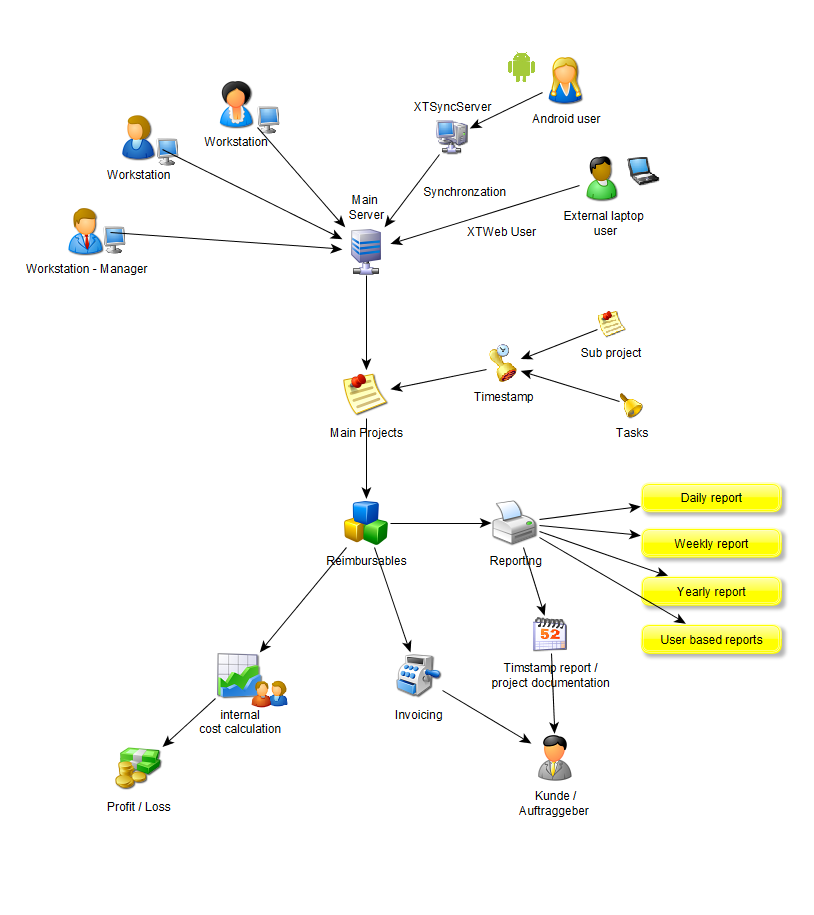
Xpert-Timer Pro should be used in multi-user mode with an MS-SQL or MySQL database. The free Express version is sufficient for this. Alternatively, an MS-Access database is included.
Data is recorded via a direct connection to the central company database. If this connection is not always available, you can record the data locally on your computer and then synchronize it with the central database using the synchronization module. (additional module subject to a fee). This ensures
that all recorded data remains within your company. If
you want to access the data from multiple locations, you can do so either via a terminal server or via a hosted or shared MySQL or MS-SQL database.
It is also possible to enter data on your Android smartphone. The data is then synchronized with the central company database via the XTSyncServer. A cable connection to the computer is not supported for data exchange.
Xpert-Timer Mobile:
Xpert-Timer Mobile works on any mobile device with Android operating system version 3.x or higher. This version is a slimmed-down version of Xpert-Timer Pro, with customer, project, and subproject levels. The mobile version can be used as a standalone application, or it can exchange data with the central database via the XTSyncServer. Further details about Xpert-Timer Mobile can be found on our website: https://www.xperttimermobil.de

