You can view the history of your projects by clicking on the menu button shown in the example or by selecting "View" -> "History on/off" from the menu. If you want to see the history of all projects, check the "All projects" box in the activity history.

In the figure below, you can see the "All projects" checkbox on the far right.

Right-clicking on a history entry allows you to edit it:

The history can also be kept independently of time stamps. This is useful for users who want to know what activities have been performed for the project, but for whom the direct reference to the time is not necessary.
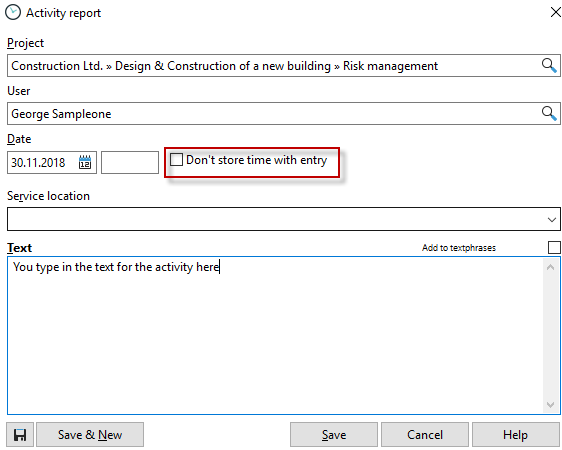
Right-click on history entries to show or hide recorded times.

In the project properties (double-click on a project in the project manager), in the "History" tab, you will also find the activity history for the respective project.

By clicking on the green plus sign, you can manually create a history entry, or you can use the keyboard shortcut Win+F2 to create a new entry. Press Ctrl+Enter to save the entry.

If you click in the activity history or timestamp area, a context menu will appear, allowing you to edit, delete, or print the entries. The content of this menu varies depending on the area, but it is available in almost all places. So feel free to right-click often in Xpert-Timer.
You can easily edit the timestamp comment by pressing F2 or clicking in the comment field. You can also copy comments and insert text modules. To do this, right-click in a comment field.
The difference between timestamp comments and activity history
|
Difference between timestamp comments and activity history |
|---|---|
Comments on timestamps are always linked to a timestamp. History entries are project-related, but not timestamp-related. You must decide for yourself which type of documentation you prefer. If you need to submit accurate lists of times to your customer, we recommend using comments. If you use Xpert-Timer for internal performance tracking, keeping a history for projects may be sufficient. |
|
